

Keep Your Kia Updated on the Go
Stay ahead with effortless Over-the-Air Software Updates for your Kia.
What are Over-the-Air Software Updates?
Kia Connect 2.0 brings cutting-edge capabilities to your vehicle through Over-the-Air (OTA) Software Updates. Now, updates for infotainment, maps, safety, and performance controllers are delivered wirelessly, ensuring the Kia EV9 and the new Carnival remain at the forefront of innovation. A prompt on your vehicle's infotainment screen will guide you effortlessly through the installation of the latest features and improvements.

Benefits to Customers
How to Update Your Kia's Software Over-the-Air
Step1
Ready for Update
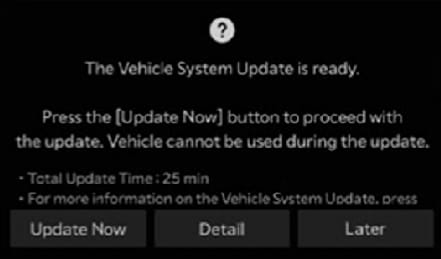
Your Kia will automatically download the latest software version while you drive, if available. Once the download is complete and your vehicle is turned off, follow the instructions on the infotainment screen to start the update.
*Note: Update items and start time may vary based on your current software version.
Step2
Monitor Update Progress
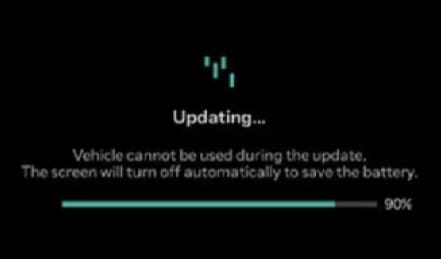
Check the update progress on your Kia's infotainment screen.
*Note: During the update process, you will not be able to operate your vehicle. Ensure you have enough time before starting the update.
Step3
Update Complete
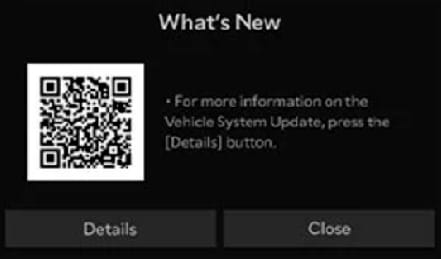
Once the update is finished, scan the QR code on the infotainment screen or call 1800-108-5005 for more information.
FAQ
Which Kia models can receive OTA updates?
What are the benefits of receiving OTA updates?
Do I need Kia Connect activated to use OTA updates?
Is it possible to schedule the OTA updates for a specific time?
What are the vehicle requirements before an OTA update?
How can I see the progress during an OTA update?
Can I use the car while an OTA update is running?
How much do OTA updates cost?
How long do OTA updates take?
Caution:
Keep These in Mind While Starting an OTA Update:
1. Allocate enough time for the update and safely park the vehicle before initiating the process. 2. Ensure all occupants are outside the vehicle during the update. 3. Do not open the hood, replace the battery, or connect diagnostic tools to the vehicle during the update, as this may cause the update to fail. 4. The vehicle cannot be used during the update. 5. The vehicle cannot be started remotely during the update. 6. Vehicle charging is not available during the update. 7. If your vehicle is equipped with the Kia Digital Key feature and it requires an update, the doors cannot be locked or unlocked using the digital key, fingerprint recognition, or face recognition. However, you can still use the smart key to lock or unlock the doors. 8. Once the update has begun, it cannot be canceled. 9. Some high-voltage systems may remain active to charge the 12V auxiliary battery during the update.
SUMMARY
- Kia over the air (OTA) updates download the latest software version automatically while you drive, and installation starts from the infotainment screen once the vehicle is turned off.
- Progress is shown on the infotainment screen, and the vehicle cannot be operated during the update.
- Kia Connect must be activated to receive OTA updates.


