

OTA Controller Updates

Over the air technical update
Our new-generation Kia models can provide technical fixes to your vehicle’s Electronic Control Unit using wireless network connectivity.
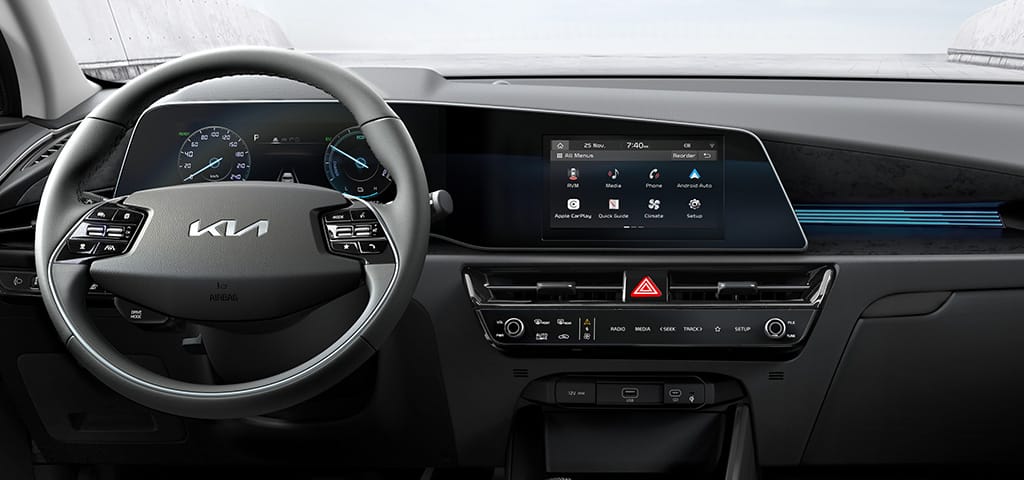
What is OTA Controller Updates?
Our new Kia models can receive wireless updates to their ECU (Electronic Control Unit), which controls key vehicle functions such as powertrain, steering, electric motor, airbags, suspension and advanced driver assistance systems.
This means Kia can deploy controller updates to fix any identified issues.
Benefits to you

Trouble-free motoring. Keep your vehicles in top working condition.

Save time and money. No need to bring the vehicle for repair, our controller fixes are delivered direct to your Kia.
Future-proofing your vehicle. Our controller updates come free for a period of 7 years from registration.
How do our Over-The-Air Controller Updates work?
-

1. Ready for update
Your Kia's latest software version will be automatically downloaded while you drive if it's available. Once the download is complete and the engine is off, you can start the update by following the instructions displayed on the infotainment screen. Please note that the update items and starting time may differ based on your current software version. -

2. Check your progress
You can check the progress of the update on your Kia's infotainment screen. *During the update process, you won't be able to operate your vehicle. Make sure you have enough time before starting the update. -

3. Update complete!
Once the update is finished, you can check it by scanning the QR code on the infotainment screen or through the Kia Connect app.
LATEST SOFTWARE UPDATES
OTA Updates OTA Updates
| Model | Update | Description |
EV3 |
Ultra Wideband (UWB) |
Improved Digital Key reliability. |
EV3 |
Cluster |
Improved cluster and Blind spot View Monitor visibility when the turn indicator is activated. |
EV3 |
Vehicle Platform Control (VPC) |
Enhances the vehicle transition from standstill on slopes. |
EV3 |
Roof Control Module (RCM) |
Improved sunroof system sleep logic to optimize the auxiliary battery efficiency. |
EV3 |
Data Communication Unit (DCU) |
Improved DCU Logic to enhance network communication and to improve remote control functionality. |
EV3 |
Integrated Charge Control Unit (ICCU) |
Improved stability of AC-charging. |
EV3 |
Integrated Charge Control Unit (ICCU) |
Improved Motor Control Unit warning light logic during EV ready. |
EV3 |
Power Tail Gate Module (PTGM) |
Improves the energy distribution in the Power Tailgate Module system in order to prevent unnecessary energy consumption from the auxiliary battery. |
EV3 |
Motor Control Unit (MCU) |
Improved AC Charging stability. |
EV4 |
VPC (Vehicle Platform Control) & MCU (Motor Control Unit) |
Improved warning light logic during initial EV Ready, |
EV4 Fastback |
Cluster |
Improved cluster and Blind spot View Monitor visibility when the turn indicator is activated. |
EV4 Hatchback |
Cluster |
Improved cluster and Blind spot View Monitor visibility when the turn indicator is activated. |
EV5 |
Auto Temperature Control Unit (ATCU) |
Improved climate control when exiting Pet Mode. |
EV5 |
Battery Management Unit/System (BMU/BMS) |
Improved accuracy of battery diagnostics to prevent false warnings and charging limitations. |
EV5 |
Vehicle Platform Controller (VPC) |
Improved instant charging function and reduces unnecessary warning messages. |
EV6 |
Air Temperature Control Unit (ATCU) |
Improved defogging performance |
EV6 |
Central Communication Unit (CCU) |
Improved OTA update reliability. |
EV6 |
Cluster |
Improved cluster and Blind spot View Monitor visibility when the turn indicator is activated. |
EV6 |
Central Communication Unit (CCU) |
Improved sleep logic to optimise the auxiliary battery efficiency. |
EV6 |
Integrated Electric Brake (IEB) |
Enhances the ESC system to improve operational consistency and prevent intermittent errors. |
EV6 |
Hands On/Off Detection (HOD) |
Improved diagnostic data capture, long term HV battery stability and to prevent 12V battery drain via the HOD controller. |
EV6 |
Data Communication Unit (DCU) |
Improved DCU Logic to enhance network communication and to improve remote control functionality. |
EV6 |
Motor Control Unit (MCU) |
Enhances the motor control system for a smoother and more stable driving experience by optimising power delivery. |
EV6 |
Shift By Wire (SBW) Actuator |
Improved gear shift operation. |
EV9 |
Integrated Electric Booster (IEB) & ADAS-PRK |
Improved system reliability with enhanced security features. |
EV9 |
Vehicle Charge Management System (VCMS) and Integrated Charging Control Unit (ICCU) |
Improved functionality and scheduling of Vehicle-to-Everything (V2X) |
EV9 |
Cluster |
Improved cluster and Blind spot View Monitor visibility when the turn indicator is activated. |
EV9 |
Roof Control Module (RCM) |
Improved rear sunshade operation logic. |
EV9 |
E-Shifter |
Software upgrade to improve gear shift operation. |
EV9 |
Wireless Power Charging (WPC) |
Improved logic and functionality. |
EV9 |
Powerline Communication Module (PCM) and Vehicle Charging Management System (VCMS) |
Improved vehicle charging stability. |
EV9 |
Shift By Wire (SBW) Actuator Update |
Improved system logic to prevent intermittent gear shift failure |
EV9 |
Body Domain Controller (BDC) and Integrated LED Headlamp Control Unit (ILCU) |
Improved control logic to prevent an incorrect tyre pressure warning light from appearing in the cluster display while driving. The Intelligent High Beams system can be activated in the vehicle settings. |
EV9 |
Data Communication Unit (DCU) |
Improved DCU Logic to enhance network communication and to improve remote control functionality. |
K4 |
Cluster |
Improved cluster and Blind spot View Monitor visibility when the turn indicator is activated. |
PV5 |
Smart Battery Management (SBM) |
Enhanced scheduled charging reliability for a more consistent charging experience. |
PV5 |
Vehicle Platform Control (VPC) |
Improved warning light during initial EV Ready |
PV5 |
Head Unit (HU) |
Improved start up logic and voice recognition reliability. |
PV5 |
Electric Brake Booster (EBB) |
Improved warning light logic. |
PV5 |
Advanced Driver Assistance System (ADAS_PRK) |
Improved parking distance warning reliability. |
PV5 |
Cluster |
Improved cluster and Blind spot View Monitor visibility when the turn indicator is activated. |
Sorento |
Integrated Electronic Booster (IEB) |
Improved system reliability with enhanced security features. |
Sorento |
Central Communication Unit (CCU) |
Improved the Central Communication Unit sleep logic to optimise the auxiliary battery efficiency. |
Sorento |
Cluster |
Improved cluster and Blind spot View Monitor visibility when the turn indicator is activated. |
Sorento |
Data Connectivity Unit (DCU) and Central Communication Unit (CCU) |
Enhanced the stability of CCS (Connected Car Service) |
Sorento |
Advanced Driving Assist System Park (ADAS PRK) |
Improves security features for smoother driving experience |
Sorento |
Power-net Domain Controller (PDC) |
Improved logic of the Daytime Running Lights (DRL) following prolonged activation of the hazard lights or turn indicators. |
Sorento |
Body Domain Controller (BDC) |
Improved logic for several electronic systems (navigation, interior lights, etc.) while driving. |
Sorento |
Digital Key System (UWB_BLE_MST) |
Improved digital key reliability by stabilising Bluetooth communication. |
Sportage |
Cluster |
Improved cluster and Blind spot View Monitor visibility when the turn indicator is activated. |
Sportage |
Body Domain Controller (BDC) |
Enhances the object detection when using Parking Distance Warning (PDW). |
*Please note that depending on the release batch, the OTA updates may not be available immediately for your vehicle

Download Manual

Customer Centre
Tel: 0333 202 2990
Frequently Asked Questions
-
Q
Which model can receive wireless software updates for controller software?
collapsed -
Q
What features allow wireless software updates for controller software?
collapsed -
Q
Do I need a Kia Connect service subscription to use the wireless software update feature?
collapsed -
Q
Is it possible to schedule wireless software updates for a specific time?
collapsed -
Q
What are the requirements for the vehicle before performing wireless software updates?
collapsed -
Q
How can the update progress be checked during wireless software update?
collapsed -
Q
Can I use the vehicle during a wireless software update?
collapsed