
Smart key (if equipped)
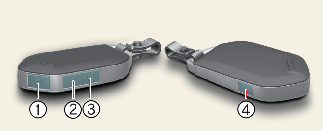
With a smart key, you can lock or unlock a door and even start the engine without inserting the key.
The functions of buttons on a smart key are similar to the remote key.
Refer to the following, for more details.
Locking (1)
All doors are locked if the lock button is pressed whilst all doors are closed.
The hazard warning lights will blink once to indicate that all doors are locked.
However, if any door, engine bonnet or tailgate remains open, the hazard warning lights will not operate. If all doors, engine bonnet and tailgate are closed after the lock button is pressed, the hazard warning lights will blink once.
Unlocking (2)
All doors are unlocked if the unlock button is pressed.
The hazard warning lights will blink twice to indicate that all doors are unlocked.
After pressing this button, the doors will lock automatically unless you open any door within 30 seconds.
Tailgate unlock (3)
If you press the button for longer than a second, the lock will be released.
Once the tailgate is opened and then closed, the tailgate will lock automatically.
Remote start (4) (if equipped)
You can start the engine and turn on the climate system by pressing the remote start button (4) outside the vehicle.To start and stop engine remotely:
-
Press the door lock button (1), and then the hazard warning lights blink once to alert you.
-
Press the remote start button (3) for more than 2 seconds to start engine within 4 seconds after pressing the door lock button (1).
-
Whilst remote starting, the hazard warning lights blink. If you want to stop the engine, press the remote start button (3) again.
The climate system will be continuously maintained, as selected when the engine is restarted. If the climate system turned off before you stopped the engine, the climate system does not operate when you start the engine remotely. If someone without a designated smart key rides your vehicle whilst remote starting, the engine is automatically stopped for security.

After remotely starting the engine, the engine will turn off automatically after 10 minutes if you do not ride your vehicle.

-
The remote start will not work if you exceed the operating distance limit.
-
Avoid idling the engine for prolonged periods to obey the emission regulations in your country.
-
Laws in your country may restrict the use of remote start. You should check country regulations before using this remote starting system.
-
It is possible to start the engine remotely when the shift lever is in P (Parking) position or in N (Neutral) position for MT transmission.
-
If the bonnet, the tailgate is opened or the handbrake is pulled below 5 notches, you can't start the engine remotely.
MT (Manual Transmission) Remote start function
Remote Engine Start allows you to start your vehicle engine remotely from your convenient place by Mobile (Kia Connect Application) or smart key with Remote Start Button.
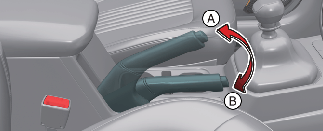
[A]: 5 notches, [B]: 0 notch
The following conditions must be met for a vehicle to start remotely:
-
All the vehicle doors including tailgate and bonnet must be closed and locked
-
Verify that the parking brake lever should be pulled above 5 notches (Notches can be detected as the "click" sound when parking lever is operated)
-
The shift lever must be in 'N' position
-
Vehicle must be parked on a flat surface or road
-
Smart key must not be placed inside the vehicle
-
If the shift lever is in other than 'N' position
-
If the parking brake lever position is less than 5th notch condition
-
If vehicle is parked on a hilly/inclined road (not flat surface)
-
If the vehicle battery is low
For remote start operation in Manual Transmission, vehicle must be parked on a flat surface.
Start-up
You can start the vehicle without inserting the key.
* For more information, refer to More Details.
Mechanical key
When the battery of the smart key is discharged or the smart key does not operate normally, the door can be locked or unlocked using the mechanical key.
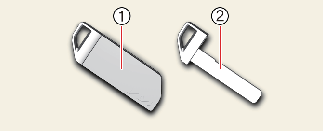
To remove the mechanical key, pull the mechanical key protective cover (1) from the mechanical key (2).
Smart key precautions
-
If, for some reason, you happen to lose your smart key, you will not be able to start the engine. Tow the vehicle, if necessary, contact a professional workshop. Kia recommends to contact an authorised Kia dealer/service partner.
-
A maximum of 2 smart keys can be registered to a single vehicle. If you lose a smart key, Kia recommends to contact an authorised Kia dealer/service partner.
-
The smart key will not work if any of the following occurs:
-
The smart key is close to a radio transmitter such as a radio station, military area, police station, government offices, broadcasting stations, transmission towers, port or an airport which can interfere with normal operation of the smart key.
-
The smart key is near a mobile two way radio system or a mobile phone.
-
-
Smart key is close with a metal product or coins
-
Another vehicle’s smart key is being operated close to your vehicle
When the smart key does not work properly, open and close the door with the mechanical key. If you have a problem with the smart key, Kia recommends to contact an authorised Kia dealer/service partner.
-
-
In the following situations, the frequency band from the smart key may be mixed with a different frequency which may cause smart key malfunction (Engine operation, Door lock function, etc.. Or working distance of smart key may change
-
The Smart key is placed near the Electronics system (Woofer, Mobile phone, Portable wired/Wireless charger, Electric heating device, Electronic power bank, e cigarettes, etc..
-
When you connect an external device to the multi purpose socket or USB port and place it near the Smart key, the Smart key may not be recognised/work in some areas of the vehicle. In this case, try moving the Smart key to another location to start the engine or press the start button directly with the smart key to start the engine
-
Tinting the vehicle windows with film, especially metalized film, may interfere with receiving frequency transmitted by the smart key, reducing its operating range.
-
If the smart key is not moved for some time, the detection function (if equipped) for smart key operation will pause. Lift the smart key to activate the detection again.